First: what actually works?
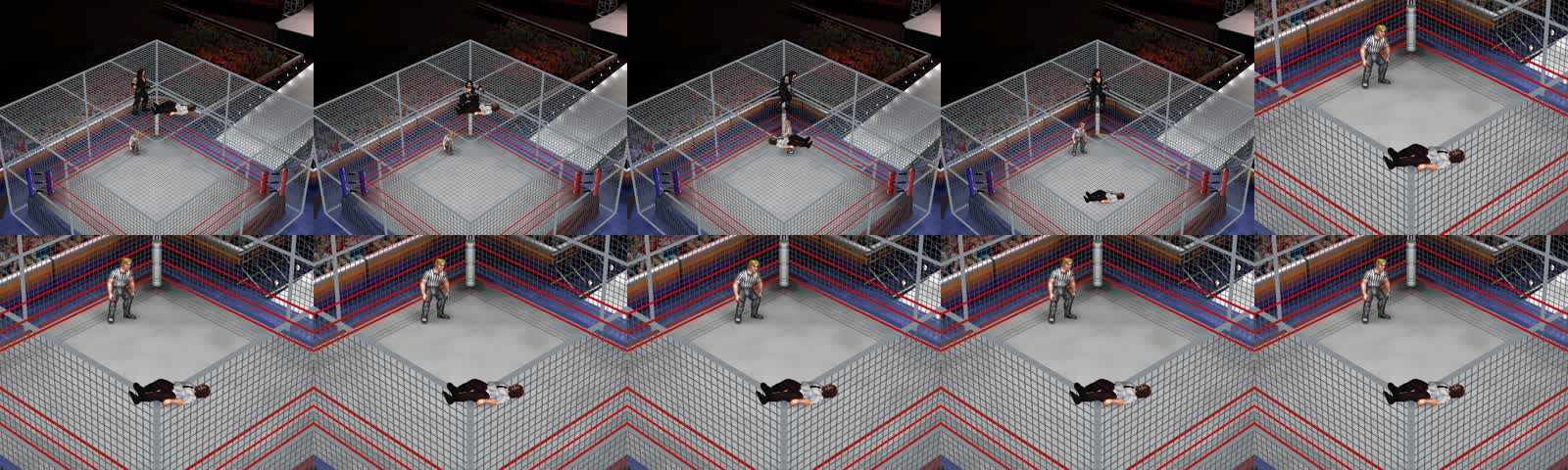
We installed two custom arenas—WWE HELL IN A CELL and WWE HELL IN A CELL (CAGE)—on Fire Pro Wrestling World’s Big Garden Arena (AR00). The supplied Cell is a modern red structure. Our video gives it a silver tint and uses a custom director to stage the 1998 moments.
The supplied cage geometry has no interaction class assigned in its CSV. It does not introduce free roof fighting, a breakable roof, or a playable 1998 Hell in a Cell match type. Ordinary match rules still come from the match you select.
The installation record shows 38 unique asset files with all texture references resolved. Our two ring entries took the local total from 200 to 202; all 731 wrestler edits remained. Those are our verification counts, not requirements for your save.
Get the pieces together.
This walkthrough covers the Windows Steam setup we used. Menu labels and compatibility can vary between releases; follow the instructions supplied with your particular ModPack and patcher.
- Fire Pro Wrestling World on PC. Launch your existing game once and check your roster before changing anything. Wrestler edits may need their own Workshop parts, moves or DLC.
- Carlzilla’s ModPack + Mike DG’s PWGR Patcher. Use the ModPack community release channel linked by Pugs and the patcher author’s instructions. Obtain versions compatible with your game; an old tutorial’s download is not a compatibility guarantee.
- The WWE HIAC arena archives. Our supplied files were two separate three-volume RAR sets: standard and CAGE. Keep all three volumes of each set together and extract from its first volume. We have not verified a public download for these exact two sets. Ask the person who supplied your pack or its creator for the complete files. The Pugs arena collection is a source for his arenas, not a confirmed link to this exact Cell.
- An archive extractor and text editor. Use an extractor that supports multipart RAR archives. A plain-text editor is enough for a careful path repair; do not let a spreadsheet silently change CSV values.
Our broader setup also included Selective Component Disable and Lord2nz’s OctagonMod. Follow your arena’s requirements for hiding arena components. Neither is a magic switch for the roof-collapse sequence.
Install it by hand.
Find your game. Back up your work.
In Steam, right-click the game → Manage → Browse local files. This folder contains
FireProWrestlingW.exe. We call it<GAME>below. Close the game and patcher.Copy your active save/profile,
ModPackData, existing custom asset folders andFireProWrestlingW_Data/Managedto a dated folder outside the game directory. Keep the patcher configuration too. The usual Windows save location is under%USERPROFILE%/AppData/LocalLow/spikechunsoft/FireProWrestlingWorld; verify the active profile if you use a save selector. Record your ring and wrestler totals.Install and test the mod foundation.
Extract the compatible ModPack and PWGR Patcher packages into
<GAME>, preserving their folder layout. Follow their release instructions. In PWGR Patcher select ModPack and the framework dependencies, including the ring/arena texture support (our setup usedModPackFrameworkandRingMat). Preserve features already in use; don’t tick every optional mod.Patch with the game closed, check the result for errors, then launch Fire Pro. Confirm the ModPack window appears and an ordinary match loads. Close the game again before installing the arena files.
Extract the Cell into a staging folder.
Extract the standard and CAGE sets separately. If an archive reports a missing volume or CRC error, stop and replace the incomplete download. Open through the repeated wrapper folders until you see
RingMats,ModPackDataandDecal. Those are the folders to merge into the game—not the outer “WWE HIAC” folder.Inspect duplicate filenames before overwriting. Our two sets shared assets; the combined installation contained 38 unique files. Keep any existing conflicting file in your backup.
Correct the folder layout.
The supplied archives needed these changes. If your release already uses the destination layout, leave it as it is.
Paths relative to <GAME> Archive layout Working layout ModPackData/Arena Edit/ModPackData/ArenaEdit/(no space)RingMats/ArenaMats/AR00_WWE HELL IN A CELL (CAGE).pngRingMats/ArenaMats/AR00/WWE HELL IN A CELL (CAGE).pngAR00_ images with _Floor, _Lights, _Parts and _Stage suffixes Move into the same AR00/folder, removing only the leadingAR00_.Arena Edit object textures ModPackData/ArenaEdit/Textures/Apply the AR00 image correction to both variants. Keep
RingMats/WWE HIAC.pngin RingMats. Preserve the pack’s Decal, Trons, TVLogos and TitleScreens subfolders. Compare your files with our 38-file installed manifest.Repair the CSV texture paths.
Open the two arena CSV files in
ModPackData/ArenaEdit/. A texture field may point to the creator’s drive or old folder names. Replace that path with the real location of the referenced image on your PC. Repair renamed AR00 paths as well. Do not change object positions, scale, rotation or other columns.Example only — use your own Steam folder: D:\SteamLibrary\steamapps\common\Fire Prowrestling World\ ModPackData\ArenaEdit\Textures\HIAC Ceiling Red.pngThe displayed path wraps for readability; a CSV field must contain one continuous path. Check every nonempty texture reference against an actual file. Keep CSV quotes, separators and headers intact. Merely copying the PNGs does not repair a reference to someone else’s drive.
Connect the arena to a custom ring.
Launch the game. In Ring Edit, create or use custom rings with these exact names:
WWE HELL IN A CELL
WWE HELL IN A CELL (CAGE)
In ModPack’s Arena Texture Database, create or select a matching entry for each ring. Set the ring mat to
WWE HIAC.png. For the Big Garden / AR00 ringside texture, selectWWE HELL IN A CELL.pngorWWE HELL IN A CELL (CAGE).pngrespectively. Save the database and ring edits.Keep the arena definitions named
AR00 - WWE HELL IN A CELL.csvandAR00 - WWE HELL IN A CELL (CAGE).csv, with their companion TXT files, in ArenaEdit. The arena number and ring name are how this setup finds the correct definition. Our installation created these ring/database entries with a local importer; this is the equivalent manual configuration, not a claim that our private importer ships with ModPack.Load a match and check persistence.
Select Big Garden Arena and the WWE HELL IN A CELL (CAGE) custom ring. Choose your normal match rules. Verify the Cell, mat, floor and stage actually render. Check both the entrance and match view if you use entrances.
Return to the menu, quit normally, relaunch and load it again. Confirm your existing wrestlers are still present and the ring entries were not duplicated. The standard variant should be tested separately. This proves your arena setup; it does not prove playable roof interactions.
Give your AI a precise job.
An assistant with local file access can inspect archives, map folders and validate CSV references. A chat-only assistant can guide you through the manual steps using your file listings and screenshots. Both still need the actual mod packages and arena files.
Copy this prompt, then provide your downloaded archive locations. It includes the boundaries that kept our existing roster intact.
Read the full AI prompt
Help me install a Hell in a Cell arena in Fire Pro Wrestling World on Windows PC. Read https://wrestling.rocks/hiac/ first. The goal is the arena and normal match setup, not a playable roof-collapse mode.

Start with a read-only inventory. Locate my real Steam game folder and active save/profile; do not assume a drive letter or username. Record game and installed mod versions, existing patch selections, wrestler/ring counts, and the supplied archive filenames. I will obtain ModPack, PWGR Patcher and the arena files through the creators' release channels. Do not invent download links or bypass access requirements.

Close the game before installation. Make a dated backup outside the game folder of the active saves, ModPackData, modified asset folders, patcher configuration and Managed assemblies. Verify the backup exists. Extract every volume of each archive to a separate staging folder first; report missing volumes and conflicting files before overwriting anything.

Use the release's installation instructions and compatible mod versions. Preserve existing mod selections. For the supplied WWE HIAC pack, check Arena Edit versus ArenaEdit, normalize AR00_ arena images into RingMats/ArenaMats/AR00/ as described in the guide, and use a CSV parser to repair texture fields to my actual paths. Preserve CSV columns, quoting and all non-path values. Check every texture reference resolves. Do not rename unrelated assets.

Create or match the exact custom ring names WWE HELL IN A CELL and WWE HELL IN A CELL (CAGE), associate their Arena Texture Database entries and select Big Garden Arena (AR00). Do not replace my save or MatData.dat with someone else's. If the installed UI or API differs, inspect it or ask for a screenshot rather than guessing. Do not install the private HiacDirectorHost or staging payloads.

Validate a loaded match visually, confirm the intended cage geometry and textures, return to the menu, restart the game and confirm persistence. Compare wrestler/ring counts to the baseline and report exactly what changed, what was tested, what remains unverified, and how to restore the backup. An existing file or successful patch log alone is not proof of a working arena.
What a useful completion report looks like
- Your real installation path and detected versions.
- A verified backup location and a list of changed files.
- Zero unresolved texture references; no accidental duplicate rings.
- A screenshot of a loaded match, then a successful restart check.
- Before/after roster counts, with anything untested clearly identified.
If it doesn’t look right.
The ring is there, but the Cell is missing.
Check that you selected Big Garden Arena (AR00) and the CAGE custom ring. Confirm the CSV is in ArenaEdit without a space, its filename matches the ring name, and your installed ModPack has arena support enabled. Test without unrelated arena-removal options. The standard and CAGE variants are separate entries.
White, missing or incorrect textures.
Compare each CSV texture field with the installed file. Old absolute drive paths, an extra wrapper folder, and the AR00_ to AR00/ conversion were the important fixes in our setup. Check names including spaces and punctuation. Don’t solve one missing image by overwriting the whole texture database.
The ring is missing from the list—or changes vanish.
Assets on disk do not create a custom ring automatically. Save the Ring Edit entry and the associated Arena Texture Database entry, then check that you are using the same save profile after restart.
The patcher reports missing methods or the game fails to start.
Stop adding features. Check the ModPack and patcher release instructions against your game version and inspect the patch log. Restore the backed-up matching assemblies/configuration if necessary. Steam verification can restore game files but may remove patches; it does not restore your custom ModPack database or saves.
Why is the cage red? Why can’t I break the roof?
Red is the supplied pack’s appearance. Silver was a runtime material change in our capture session. Roof movement, collapse and the table fall were directed scenes. They are not missing installation steps.
How do I roll back?
Close Fire Pro and the patcher. Restore the matching pre-install save/profile, ModPackData, changed assets, assemblies and patcher configuration from your dated backup. Remove only newly added files recorded in your install manifest. Keep newer progress separately before restoring an older save.
How we made the 1998 moments.
The arena was the set. A local C# director was the choreography. It placed the wrestler edits, triggered paired native Fire Pro animations, changed roof pieces and staged the table collapse. The first fall targeted the arena’s actual commentary desk, Arena00_Commentary_L.
Our Undertaker and Mankind edits had local IDs 10330 and 10336. Those IDs belong to this save, so copying them into somebody else’s script would not reliably select the same wrestlers.
For the thumbtack scene we added 540 flat tack silhouettes with silver heads and adjusted their rendering so wrestler sprites remained above the pile. The mat shots used the game’s native layered camera passes to fix horizontal clipping. These were capture-specific visual changes.
HiacDirectorHost and the staging payloads were experimental local tools. This page does not distribute them or promise that an AI prompt can reproduce a playable version of those scenes. You can install and enjoy the arena without running them.
Credit the people who built the tools.
Pugs — arena texture work and the collection used in our broader setup. Carlzilla — ModPack. Mike DG — PWGR framework and patcher. Lord2nz — OctagonMod.
These credits describe our installed toolchain; they do not assign authorship of the separately supplied HIAC archive to all four creators. Original game: Spike Chunsoft. Our recreation references WWE Vault’s Undertaker vs. Mankind footage.
Guide based on our September 6–7, 2026 local installation manifest, arena import source and capture notes. The manual UI route above describes the equivalent configuration; a fresh installation on another PC has not been tested. Exact HIAC archive availability remains unverified.